
In the industrial world, touch technology is a major factor in the performance, durability and the user experience of touch based devices. The selection of the appropriate technology is essential whether you are creating factory HMIs, open-air kiosks, or medical equipment interface. Whether PCAP (Projected Capacitive) or resistive touch technology will be used is frequently a matter of multiple variables including the environmental factors, functionality required, and budget.
By choosing the most suitable touch solution, it is possible to make the user interface intuitive, responsive and robust, with a consumer experience of smooth interaction. To make the most suitable choice in the context of industrial applications, we will explore the main differences between PCAP and resistive touch technology.
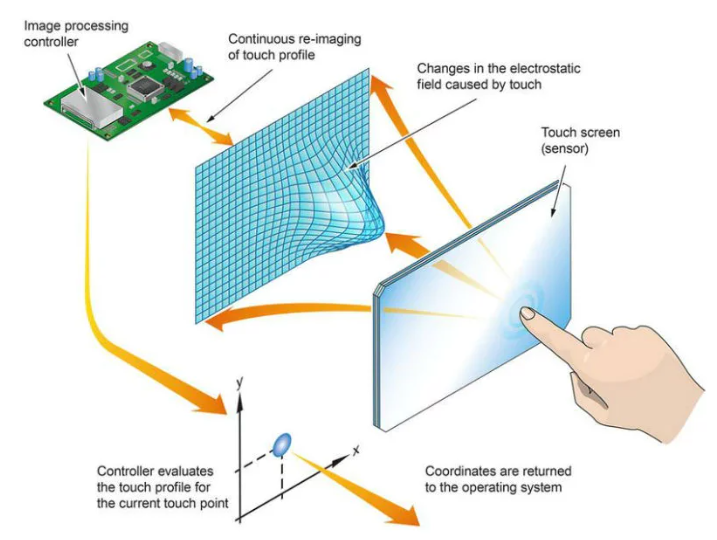
Projected Capacitive (PCAP) touch technology is based on capacitive sensors to detect touch. As a user touches the screen, the change in capacitance is recorded by the screen enabling the screen to sense a finger or stylus. PCAP technology is typically observed in consumer electronics, including smartphones and tablets, but is now being used in industry, due to its accuracy, reliability, and capability of supporting multi-touch gestures such as pinch, zoom, and swipe.
The PCAP touch screens are very sensitive and therefore offer a smooth and responsive experience and thus suit well in the complex industrial processes whereby operators require to interact with the system in a manner that is frequent and efficient.
Resistive touch technology is based on the use of pressure. It is a formation of two conductive layers with a small gap in between. When the screen is pressed, the two layers come in contact with each other, and the system interprets the touch. The technology is also best adapted to those environments where various inputs are required, e.g. gloves, styluses or even objects like pens.
Resistive touch is also said to have the ability to withstand extreme conditions, making it resistant to the physical threats of the environment, so it is a preferred choice when it comes to low cost or rugged applications.
PCAP touch offers a very responsive feel, with fluid and smooth interactions and can detect multi-touch gestures. Its responsiveness is ideal in those applications where precision is needed, e.g., factory automation or medical equipment. Resistive screens, conversely, need to be pressed harder to respond to a touch, and are less intuitive, but does have the benefit of tactile feedback, which can be helpful in certain settings.
The capacity to work with multi-touch inputs is one of the most important features of PCAP touch since it allows such gestures as zoom, swipe, and rotate. This is especially critical in industrial applications whereby several inputs might be required concurrently. Single-touch Resistive touch is generally only single-touch, so it is not capable of the complex interactions of multiple simultaneous inputs.
PCAP touch screens tend to be more optically clear than resistive touch screens. The absence of an extra coating between the touchscreen and display panel makes the visuals clearer, particularly in a bright setting or at an angle. The extra layers on resistive touch screens may cause distortion and decrease in clarity particularly under harsh light conditions.
Physical durability is an advantage that resistive touch technology has. It is resistant to scratches, hits and extreme amounts of wear and tear. This is best suited to situations where the touch-screen may be exposed to sharp things or used intensively. Conversely, PCAP screens are more vulnerable to physical abuse especially by sharp objects or hard hits, though they are more durable.
The possibility of using the screen with gloves is a significant factor that needs to be taken into account in industrial applications. Touch technology Resistive touch technology can be used with gloves because this technology is pressure-based. This is appropriate in places such as factories, warehouses or even medical facilities where employees are frequently expected to put on protective gloves. PCAP displays typically need bare fingers or a capacitive stylus, which is less convenient in a setting that requires the use of gloves.
Resistive touch technology is best in wet or humid conditions. Being pressure-sensitive and not capacitance-sensitive can be used to sense input even when the screen is wet. It comes in handy especially in outdoor terminals, kiosks or in machine that might be exposed to rain or moisture. On the other hand, PCAP displays may not perform well in a wet environment because water may disrupt the capacitive sensors and therefore, the touch points may be detected.
PCAP monitors are usually less expensive and less prone to servicing as they do not involve very many moving components and they are also normally resistant to scratches and wear. They are also easier to maintain and clean as they have smooth surfaces. Conversely, resistive screens normally develop scratches and dirt between the layers which might need frequent cleaning and maintenance to maintain their consistency in performance.
PCAP is generally a superior option in the case of factory Human-Machine Interfaces (HMIs). The high multi-touch feature, optical clarity, and speed of PCAP makes it very appropriate in interactive display in factory environments where operators require to interface with complex systems in an efficient way.
Resistive touch technology can still be more suitable in outdoor applications, where the screen is subjected to the elements. Resistive touch is also suitable in extreme weather conditions such as outdoor terminals because it can work with gloves and it is resistant to wet conditions.
Simple control panels can be provided with resistive touch technology, which is quite affordable. In case the application needs minimum user interaction and durability, resistive touch would be the appropriate option because it is affordable and tough.
Resistive touch screens have been adopted in areas where there is high usage and that is subject to high impact like in the case of heavy machinery or in high impact areas. They can be used in applications that require a lot of durability because of their resistance to physical damage.
PCAP is the choice of applications that have high responsiveness, multi-touch capability, and optical clarity. It is a great solution to complex HMIs, high-performance touch screens and where a user experience of a high level is needed. PCAP is the solution when your project has a complex interface or machinery with complex controls.
Resistive touch is still applicable to low cost or rough industrial applications where compatibility of the gloves, resistance to moisture or wear and tear is very important. It finds specific application in simple, rough uses where the functionality is more important than the appearance or sophisticated user interface.
Although PCAP technology is more suitable in most industrial uses where responsiveness is needed as well as the ability to use a multi-touch device and optical-based touch, resistive touch is still very important in the environment where ruggedness, compatibility with gloves, and cost-effective solutions are required. Finally, your industrial project may have a particular set of needs, and this will determine the most appropriate decision.
PCAP displays tend to be more durable particularly under conditions with little physical activity. Nevertheless, resistive touch screens are more resistant to scratches and other physical damage, which means that they will last longer in rough conditions with lots of wear and tear.
PCAP screens are generally non-glovable, unless designed to be so, with capacitive styluses or special types of gloves. In case of imperative glove compatibility, resistive touch proves to be more dependable.
Yes the resistive touch screens are usually cheaper as compared to PCAP screens. Resistive touch is the choice of low-budget or basic-industrial applications due to the ease of construction and lower material costs.
PCAP screens consume more power than resistive touch screens due to the capacitive sensors' operation. But this difference usually is not very significant in practice, and is compensated by the extra functionality and responsiveness of PCAP.
5.Do resistive touch screens perform better in high and low temperatures?
The touch screens which resist are better suited to extreme temperatures. They can also withstand a greater range of heat or cold conditions than PCAP screens which might have smaller operating limits.


